

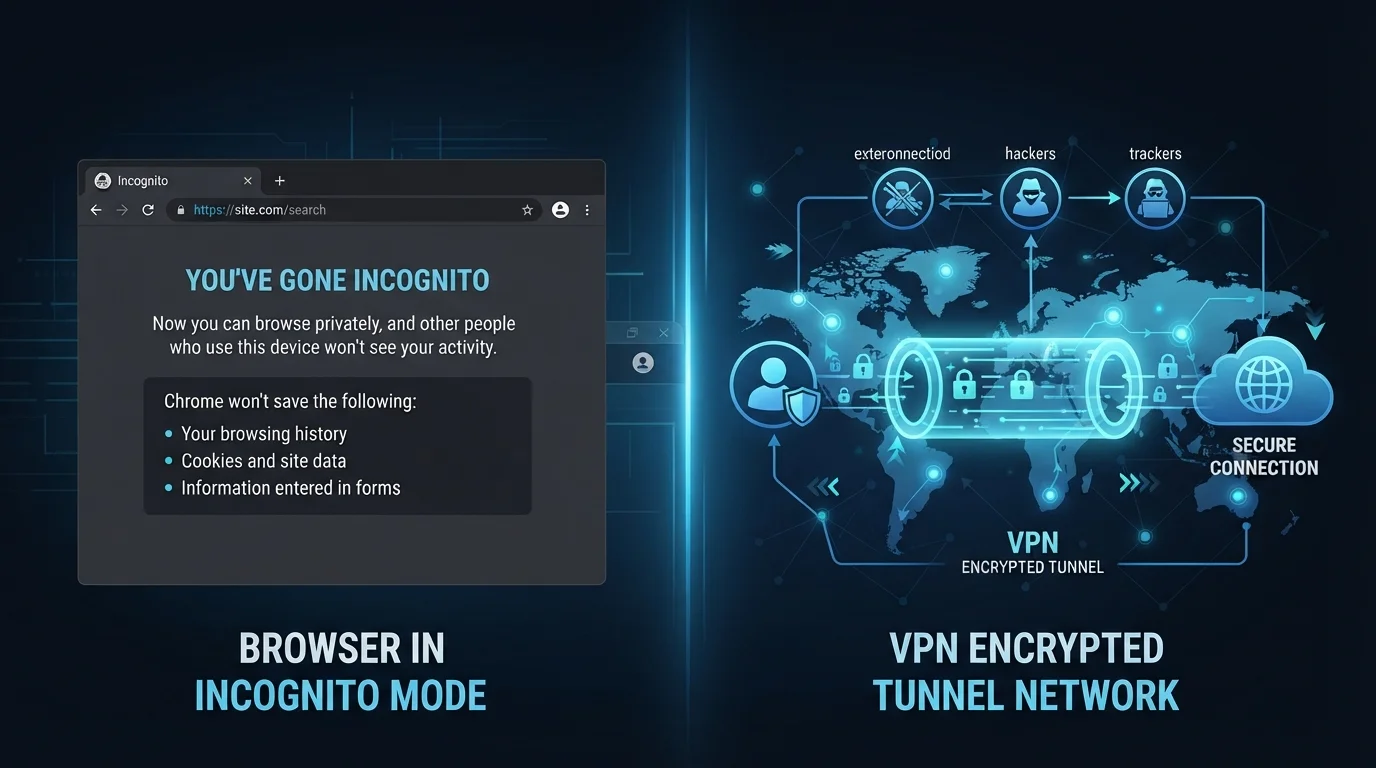
Key Takeaways
Option A
VPN (Virtual Private Network)
The network-level privacy shield for your internet traffic.
Best for: Anyone wanting to hide their browsing activity from their ISP, employer network, or public Wi-Fi observers.
Option B
Incognito Mode
The local privacy tool that clears your browser's memory.
Best for: Anyone who wants their browsing session to leave no local history, cookies, or cached data on a shared device.
If you're using a public or shared computer and don't want your accounts or history left behind
Incognito Mode
Incognito prevents the browser from storing cookies, passwords, and session data locally — exactly what matters when you walk away from a shared device.
If you're on public Wi-Fi and want to protect your data from network snooping
VPN (Virtual Private Network)
A VPN encrypts your traffic at the network level, making it far harder for anyone on the same network to intercept what you're doing.
If you want to prevent your internet service provider from seeing your browsing habits
VPN (Virtual Private Network)
Incognito mode has no effect on what your ISP can observe. A VPN routes and encrypts traffic so your ISP only sees that you're connected to a VPN server.
If you want to keep a surprise purchase or sensitive search off a family device's history
Incognito Mode
Incognito is purpose-built for exactly this scenario — it leaves no local trace once the window is closed.
What Each Tool Actually Does
Confusing VPNs with incognito mode is one of the most common digital privacy mistakes everyday users make. The two tools operate at completely different layers of your device and network, which means they solve genuinely different problems — and fail to solve each other's.
Incognito mode (called Private Browsing in Firefox and Safari) is a browser-level feature. When you open an incognito window, your browser agrees not to save your browsing history, cookies, site data, or information entered into forms during that session. When you close the window, that data is discarded. That's the entirety of what it does.
A VPN — short for Virtual Private Network — works at the network level, not the browser level. It creates an encrypted tunnel between your device and a VPN server, routing your internet traffic through that server before it reaches its destination. This masks your real IP address from the websites you visit and makes your traffic unreadable to anyone observing the network between you and that server — including your internet service provider (ISP) and anyone on the same Wi-Fi network.
See our guide to Wi-Fi network risks for a deeper look at why network-level protection matters, especially on public hotspots.
| Criterion | VPN | Incognito Mode |
|---|---|---|
| Where it operates | Network level | Browser level |
| Hides activity from ISP | Yes | No |
| Prevents local history saving | No | Yes |
| Masks your IP address | Yes | No |
| Encrypts network traffic | Yes | No |
| Clears cookies on close | No | Yes |
| Requires additional software | Yes | No (built into browsers) |
| Makes you fully anonymous | No | No |
What Each Tool Does NOT Do
Understanding the limits of these tools is just as important as knowing their strengths — and this is where a lot of people develop a false sense of security.
Incognito mode does not:
- Hide your activity from your ISP, employer, school, or network administrator
- Prevent websites from identifying you through your IP address
- Block trackers or third-party advertising scripts during the session
- Protect any data you actually submit — logins, purchases, and form entries still travel across the network normally
A VPN does not:
- Delete local browser history or cookies — those still accumulate on your device
- Make you anonymous: websites can still identify you through browser fingerprinting, login sessions, and tracking pixels
- Protect you from malware, phishing sites, or data breaches at the destination server
- Prevent the VPN provider itself from seeing your traffic — you are trusting them instead of your ISP
The online privacy myths that give people false confidence are worth reading alongside this — incognito mode topping that list will come as no surprise.
VPN Providers Can See Your Traffic
When you use a VPN, you're shifting trust from your ISP to the VPN provider. Reputable providers publish independently audited no-logs policies, meaning they claim not to store records of your activity. However, the quality and scope of those audits vary, and no system is perfectly verifiable from the outside. Choosing a VPN is a privacy decision, not a privacy guarantee.
When to Use One, the Other, or Both
Now that the mechanics are clear, the practical decision becomes straightforward.
Reach for incognito mode when your concern is local — you're on someone else's laptop, you're shopping for a gift on a shared family computer, or you simply don't want a search showing up in autocomplete later. It's a lightweight, always-available tool for keeping things tidy on the device itself.
Reach for a VPN when your concern is the network — you're at a coffee shop, airport, or hotel on public Wi-Fi; you're traveling internationally and want consistent access to services; or you want your ISP to have less visibility into your daily browsing patterns. A VPN is a more substantial tool that requires a bit more setup and a degree of trust in the VPN provider you choose.
You can use both at the same time — a VPN running in the background while you open an incognito window addresses two different layers simultaneously. But it's worth remembering that layering tools doesn't make you invisible. You're still identifiable when you log into accounts, and websites can still collect substantial data through legitimate means.
If you're curious about how native applications compare to browser-based tools for tasks like these, native apps vs. browser-based tools explores the tradeoffs in detail.
85%
Users who misunderstand incognito mode's protections
A study by researchers at the University of Chicago and Leibniz University Hannover found that a large majority of users held incorrect beliefs about what private browsing actually prevents.
1 in 3
US internet users who have used a VPN
Surveys by Statista and GlobalWebIndex have consistently found roughly a third of US adults reporting VPN use, though reasons and frequency vary widely.